We were all working hard towards the NIPS deadline, when I suddenly noticed a menu in my emacs editor called "Preview". Being mostly a purely key-command and Meta-x kind of emacs user, I seldom look up at the menu, but this got me interested.
So I go up there and click on "Generate previews... for section" (you know, always be on the safe side, no idea what that'll do to the whole document), and, whoa!
It seems that somebody actually had enough time on his hands to write some code which takes all the figures and math formulas, extract them to a separate file, runs latex on them and then reincludes the previews into the editor. In LISP!!!
Man, that has got to be the most incredible emacs feature, ever.
A few minutes later, I disabled the previews. I think it is like in the movie matrix: Once you have learned to read the code, just seeing the rendered version doesn't make you happy anymore. :)
Showing posts with label /Misc. Show all posts
Showing posts with label /Misc. Show all posts
Friday, June 06, 2008


Monday, November 12, 2007
Steve Yegge
I recently stumbled upon (in its actual meaning, not using the website) over Steve Yegge's blog. Actually it was via some page on emacs lisp which I'm unable to retrieve now. In any case, his Tour de Babel tour of programming languages is quite funny, as most of his other posts are. If you have some time to kill, I can heartily recommend his blog. Also, don't miss his talk at OSCON 2007.
Tuesday, September 11, 2007
SICP
Some time before I began studying computer science, I heard of the book "structure and interpretation of computer programs". As I was always on the search for new, life changing computer languages (as someone once said: "A programming language which does not change the way you think about programming is not worth learning"), I was quite eager to get my hands on the book. However, it was out of print back then, or at least impossible to get in Germany for an agreeable price.
So I started to learn scheme from the official standard document which turned out to be rather painful. Anyway, years passed by, I learned C++, finally got back to C, learned python, then ruby, played a bit around with haskell, and emacs lisp. And suddenly I learn that the whole book is online.
Well, turns out that ten years later things are maybe not that exciting any more, but still, maybe this book can still change your life ;) Who knows what I'd be doing now if I read this books back then... .
So I started to learn scheme from the official standard document which turned out to be rather painful. Anyway, years passed by, I learned C++, finally got back to C, learned python, then ruby, played a bit around with haskell, and emacs lisp. And suddenly I learn that the whole book is online.
Well, turns out that ten years later things are maybe not that exciting any more, but still, maybe this book can still change your life ;) Who knows what I'd be doing now if I read this books back then... .
Tuesday, August 14, 2007
Visual Timeline
I know this is quite old, but it is absolutely hilarious. Some of the "visuals" have the potential to become community memes of their own.
Thursday, December 21, 2006
Miscellaneous Things - Part I
Hi there, finally after visiting some project partners in Finland and attending this years NIPS conference, I'm finally back.
I'd like to finish of this year (or at least the pre-Christmas period) with pointers to two interesting pages which are not all that new (but interesting...):
Clay Shirky has some nice articles on semantic web and the futility of building an ontologoy which fits all applications. As I said these articles are not new but contain many nice examples to illustrate why such a top-down approach might not be a good idea.
Then, being a scientist myself and therefore depending on getting my work published, the existing peer review process is always a topic worth discussion. It seems that the nature magazine has recently picked up on that topic.
Merry Christmas!
I'd like to finish of this year (or at least the pre-Christmas period) with pointers to two interesting pages which are not all that new (but interesting...):
Clay Shirky has some nice articles on semantic web and the futility of building an ontologoy which fits all applications. As I said these articles are not new but contain many nice examples to illustrate why such a top-down approach might not be a good idea.
Then, being a scientist myself and therefore depending on getting my work published, the existing peer review process is always a topic worth discussion. It seems that the nature magazine has recently picked up on that topic.
Merry Christmas!
Monday, October 30, 2006
Ctrl -> CapsLock
I have to admit it, I'm also one of those freaks who moved their Ctrl key! You see, the problem is that I used to operate the left control key with my thumb. I could show you photos of this, but trust me, you don't want to see those... .
Usually, this is no problem at all (meaning I take only negligible physical damage), but every once in a while I have to type a lot (like finished my Ph.D. thesis), and then the situation just gets worse.
But there is a solution! Just move your control key up to the caps-lock key. This is cool for several reasons:
The only question is, how to do it. Well, fortunately, it is rather simple:
Usually, this is no problem at all (meaning I take only negligible physical damage), but every once in a while I have to type a lot (like finished my Ph.D. thesis), and then the situation just gets worse.
But there is a solution! Just move your control key up to the caps-lock key. This is cool for several reasons:
- You can hit the (new) control key with your little finger - with even less strain than the original left control key.
- On laptops, the control key is often moved to different positions, while the caps-lock key isn't.
- It makes me think of the good ol' C=64:

(Although for that, I would have to move the control key up to the tab key...) - You won't be able to use other computers any more.
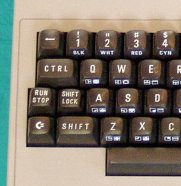
The only question is, how to do it. Well, fortunately, it is rather simple:
- Gnome/KDE: Just go to the keyboard preferences, setxkbmap options. There you can turn your caps-lock key into an additional
control key. - Plain X (Xorg): setxkbmap -option "ctrl:nocaps". Also see here for more options.
- Win XP: Open up
regedit. Then add toHKEY_LOCAL_MACHINE\SYSTEM\CurrentControlSet\Control\Keyboard Layouta binary value namedScancode Mapand set it to
                 00 00 00 00
                 00 00 00 00
                 02 00 00 00
                 1d 00 3a 00
                 00 00 00 00
Don't forget to reboot! Believe me, it's magic and it works!
Subscribe to:
Posts (Atom)


 Posts
Posts

